

Frequently Asked Questions
Is the RTX 3050 CPU-demanding?
No — it’s an entry-level GPU, so even a modest current-generation CPU is enough to avoid bottlenecking it. Spending heavily on the CPU side isn’t necessary here.
Should I prioritize CPU or GPU on a tight budget with the RTX 3050?
At this tier, GPU and platform cost matter more than chasing a higher-end CPU. Put the budget toward a balanced build rather than an oversized processor.
Will an older platform bottleneck the RTX 3050?
Only if the CPU itself is genuinely dated (older than a few generations back). A budget current-gen chip keeps pace with this GPU comfortably.
How do I check my exact CPU and GPU pairing?
Run it through our <a href=”https://pcbottleneckcheck.com/bottleneck-check/”>bottleneck calculator</a> to confirm before you buy or upgrade.
Best CPU for RTX 3050 Low Budget Setup: The Ultimate 2026 Guide
Choosing the best CPU for RTX 3050 in a low budget setup can be frustrating for many users, especially when they face issues like CPU bottlenecking, low FPS, stuttering in games, or wasting money on the wrong processor. Many beginners either pair the RTX 3050 with outdated CPUs (like older i5 or FX series) or overspend on high-end processors that don’t significantly improve performance, leading to an unbalanced build. The solution is to focus on modern, budget-friendly CPUs with strong single-core and multi-core performance, such as the Ryzen 5 5600 for the best value, Intel i5-12400F for better future-proofing, or Ryzen 5 5500 for ultra-budget builds. These processors ensure smooth 1080p gaming, minimal bottlenecks, and optimal price-to-performance ratio, making them the ideal choices for building a powerful yet affordable RTX 3050 gaming PC in 2026.
Building a budget gaming PC is all about balancing the price-to-performance ratio. If you have picked the NVIDIA GeForce RTX 3050 (whether the original 8GB version or the highly popular, wallet-friendly 6GB variant) as your graphics card, you have a solid foundation for 1080p gaming. However, pairing it with the wrong processor can cause a hardware bottleneck, leaving your GPU starved for data.
To help you get every frame you paid for without breaking the bank, we have analyzed architectural performance, platform longevity, and real-world gaming benchmarks to bring you the best CPUs for an RTX 3050 low-budget setup.
Understanding the RTX 3050 Bottleneck Dinamics
Before looking at the chips, we need to address a common myth: you need an expensive CPU to avoid bottlenecking.
The RTX 3050 is a modest, entry-level 1080p GPU based on the Ampere architecture. Because it isn’t pushing 150+ FPS on ultra settings in heavy AAA titles, you don’t need an elite Core i7 or Ryzen 7 processor. A solid, modern 4-core or 6-core budget processor is the sweet spot. It ensures your GPU runs at 95-100% utilization in most games, minimizing stuttering and stabilizing your 1% low frame rates.
Top 3 Budget CPUs for RTX 3050 in 2026
1. AMD Ryzen 5 5600X / 5600 (The Uncrowned King of Budget Performance)
The AMD Ryzen 5 5600 remains an absolute powerhouse for budget builders. Operating on the mature AM4 platform, this 6-core, 12-thread processor provides a massive L3 cache (32MB of AMD GameCache) which drastically stabilizes frame rates in esports titles like Valorant, CS2, and Fortnite.
- Why it fits the RTX 3050: It completely eliminates any CPU bottleneck and gives you headroom if you decide to upgrade to an RTX 4060 or RX 7600 down the road.
- Platform Cost: Motherboards (B450/B550) and DDR4 RAM are incredibly cheap, keeping your overall system cost very low.
2. Intel Core i3-12100F (The Ultra-Budget Value Champion)
Don’t let the “i3” label fool you. The Intel Core i3-12100F utilizes Intel’s Golden Cove architecture, delivering incredible single-core performance that punches way above its price tag. With 4 cores and 8 threads, it handles modern 1080p gaming smoothly.
- Why it fits the RTX 3050: It is arguably the cheapest CPU that will never bottleneck an RTX 3050. It runs cool, meaning you can comfortably use the included stock cooler and save money.
- Platform Cost: It pairs perfectly with budget-friendly H610 or B660 motherboards.
3. AMD Ryzen 5 5500 (The Absolute Lowest Cost 6-Core)
If your budget is stretched to the absolute limit but you still want 6 physical cores for multitasking, Discord streaming, or light video editing, the Ryzen 5 5500 is a great alternative. It is slightly slower than the 5600 due to a halved L3 cache (16MB) and PCIe 3.0 limitation, but it pairs beautifully with the RTX 3050
Head-to-Head Comparison Table
| CPU Model | Cores / Threads | Base / Boost Clock | L3 Cache | PCIe Support | Best Suited For |
|---|---|---|---|---|---|
| Intel Core i3-12100F Entry | 4 / 8 | 3.3 / 4.3 GHz | 12 MB | PCIe 5.0 & 4.0 | 🎮 Pure gaming on the tightest budget |
| AMD Ryzen 5 5500 Budget | 6 / 12 | 3.6 / 4.2 GHz | 16 MB | PCIe 3.0 | 💻 Budget multitasking & light streaming |
| AMD Ryzen 5 5600 Best | 6 / 12 | 3.5 / 4.4 GHz | 32 MB | PCIe 4.0 | 🚀 Maximum performance & future GPU upgrades |
Key Factors to Consider When Buying a Budget CPU
When mapping out your hardware setup, keep these critical technical aspects in mind:
- Motherboard VRMs & Chipset: For Intel, an H610 motherboard is fine for an i3, but a B660/B760 gives you better memory overclocking. For AMD, skip the restrictive A320 chips and pick at least a B450 or B550 board so you can tweak performance settings.
- PCIe Lanes and Generation: The RTX 3050 8GB runs on a PCIe 4.0 x8 interface, while the 6GB variant relies heavily on its lane configuration. Pairing them with a PCIe 4.0 capable CPU (like the i3-12100F or Ryzen 5600) ensures no bandwidth constriction.
- RAM Configuration: Never run single-channel memory. Ensure you get a 2x8GB (16GB total) DDR4 kit running at a minimum speed of 3200MHz to avoid artificial CPU performance dips.
Final Verdict: Which One Should You Choose?
- Choose the Intel Core i3-12100F if your goal is strictly gaming, you want the lowest price tag today, and you prefer a newer platform upgrade path (LGA1700).
- Choose the AMD Ryzen 5 5600 if you can spend an extra $20-$30 to secure a highly stable 6-core chip that will easily handle future mid-range graphics card upgrades.
- Choose the AMD Ryzen 5 5500 if you absolutely require 6 cores for background apps and productivity but cannot afford the step up to the 5600.
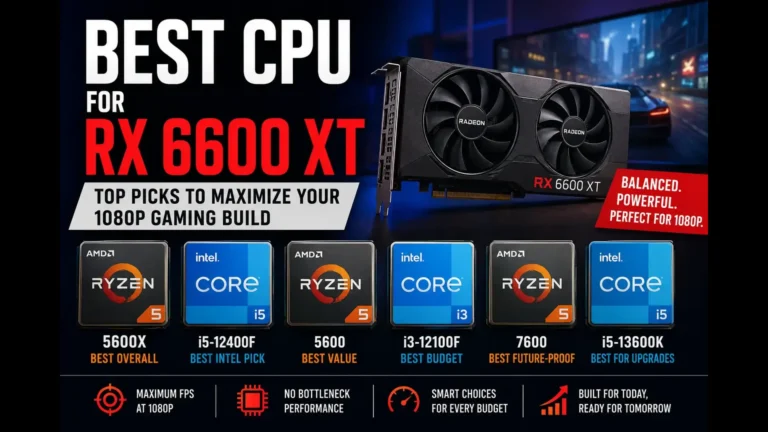
If you’re building a PC around the RX 6600 XT, our detailed guide on The Best CPU for the RX 6600 XT can help you choose a processor that delivers balanced performance and excellent value.
Test your system performance with our Bottleneck Calculator

One Comment
Comments are closed.